Everything about the Smart Oil Gauge
How it installs, what it fits, what it costs to run, and what happens if something goes wrong. If your question isn't answered here, call 203-456-1499 or email contact@smartoilgauge.com.
Frequently asked questions
Buying and fitting
Where on my tank do I install the Smart Oil Gauge?
The Smart Oil Gauge goes in one of the openings on the top of the tank. There is typically at least one unused opening with a plug in it — another opening is used for the existing gauge, another for the fill pipe, and another for the vent. Unscrew the plug from one of the unused openings and install the Smart Oil Gauge in its place. Not sure which one? The fit finder walks you through it in two questions.
What size opening does it fit into?
A 2″ NPT opening on the top of the tank — the most common fitting. Note that the outer diameter of a 2″ NPT pipe is not 2 inches but closer to 2-3/8 inches. Adapters are available for 1.5″ and 1.25″ openings, and for Roth tanks.
Do I need an adapter?
Only if your fitting isn't 2″ NPT, or if you have a Roth double-wall tank. When you do, it has to be the adapter made for your model — the Duo's adapters and the Original's are different parts and are not interchangeable. The 1.25″ adapter pairs with the Original only; the Duo does not fit a 1.25″ opening.
Will it work on a Roth tank?
Yes, on the 400L, 620L, 1000L and 1000LH, using the Roth adapter for your model. The Roth 1500L has internal baffles that block the ultrasonic signal, so neither gauge can read it reliably and we don't sell one for it.
What size tank is the Smart Oil Gauge designed for?
Standard vertical or horizontal 138, 220, 240, 275 and 330 gallon above-ground tanks, as well as 500 and 550 gallon cylindrical tanks. A Roth adapter is required for 400L, 620L, 1000L and 1000LH; not compatible with the Roth 1500L. Custom tank sizes can often be accommodated — call 203-456-1499 or email contact@connectedconsumerfuel.com to check. Above-ground tanks only.
Is it intended for outdoor use?
The Smart Oil Gauge can be used indoors or outdoors. For outdoor installations the white cap must be sealed with Teflon tape or other means to prevent moisture ingress; failure to do so voids the warranty. Expect readings to fluctuate with temperature changes. The Duo is also sold in a version rated for outdoor use.
What tools are required for installation?
A standard 14″ or larger pipe wrench is all you need to remove the plug from the top of your oil tank and install the gauge. Use pipe dope on the threads to create a seal. Do not use Teflon tape on the threads that mate with the tank — it can break down and end up in the oil over time. Teflon tape is fine on the white cap, since those threads are not exposed to oil.
What's in the box?
The gauge, batteries and instructions — everything you need for the install. Nothing else to buy unless your tank needs an adapter.
How fast does it ship?
Order by 1pm Eastern on a business day and it goes out that day. After that, it ships the next business day. Shipping is free either way.
Using it
Are there any monthly fees?
No, there are no monthly monitoring fees.
Can I check the tank level when I'm not home?
Yes, from anywhere in the world. Your phone does not have to be connected to your home's router to see what's in the tank.
How can I tell if I have a Wi-Fi connection at my tank?
Walk down to the tank with your phone, tablet or laptop. Put the phone in Airplane Mode and turn Wi-Fi on only, then open your browser and see if you have internet access. If the connection is weak, consider a Wi-Fi range extender.
What is the Upload Interval?
The upload interval, in hours, is how long the gauge waits before waking up and uploading its latest readings. A setting of 1 uploads every hour; a setting of 24 uploads once a day. The gauge still takes a reading every hour either way — it just holds them until the interval passes. A longer interval means longer battery life.
What type of batteries does it take, and how long do they last?
Two SAFT LS14500 3.6V lithium AA batteries, which are readily available online and included with a new gauge. A set typically lasts one to three years depending on Wi-Fi strength and upload interval. The app shows the battery level, and we usually recommend ordering a fresh set when it displays Fair or Poor. Set your upload interval to 24 to maximise battery life.
I just had my tank filled, but it isn't reading completely full. Why?
On a single-sensor gauge, a freshly filled tank often has oil too close to the ultrasonic sensor for a reliable reading, so it reads Full. There is also an air space kept at the top of the tank to prevent over-filling, so a “275-gallon” tank typically holds around 250 gallons when completely full. The Smart Oil Gauge Duo has a second sensor that reads all the way to the top, which is what it was built for.
I changed my Wi-Fi password or installed a new router. How do I update the gauge?
Open the app and go to the My Tanks page. On iOS, tap the ‘+’ in the top right; on Android, select ‘Sensor Setup’. The app will ask whether you are setting up a new gauge or updating Wi-Fi — choose update Wi-Fi and follow the instructions.
How do I program alerts?
On iOS, tap Configure, then ‘# of Notifications’, then the ‘+’ to add an alert. Enter the email address or phone number and press Done. On Android, open the Smart Oil page, tap the three dots at the top right, then Configure, then ‘# of Notifications’; tap ‘+’ for each alert and save when you're done. Step-by-step instructions are on the alerts page.
Warranty and returns
What is the warranty?
New gauges bought on this site carry a two-year replacement warranty from the date of purchase. Refurbished gauges carry one year. Full details are on the returns and warranty section of the shop page.
What is the policy on returns and refunds?
New units can be returned within 90 days of purchase for a full refund. Email support@smartoilgauge.com to start a return — see the returns section for what to expect.
Technical specifications
| Fitting | 2″ NPT (measures approximately 2.375″); 1.5″ and 1.25″ adapters available |
|---|---|
| Dimensions | 2.8 × 2.8 × 5.3″ |
| Clearance required above tank | 6.2″ (to allow access to the batteries) |
| Shipping weight | 1 lb. 5 oz. |
| Batteries | SAFT LS14500 3.6V lithium AA (2×) — included and replaceable |
| Sensor type | Ultrasonic. Single sensor on the Smart Oil Gauge, dual on the Duo |
| Sensor operating range | 8″ to 72″ (Smart Oil Gauge) · 0″ to 72″ (Duo) |
| Communication | Wi-Fi — 2.4 GHz |
| Monthly fees | None |
Tank sizes
138, 220, 240, 275 or 330 gallon, single or side-by-side, vertical or horizontal, indoor or outdoor*. Roth double-wall tanks work with the Roth adapter for your model.
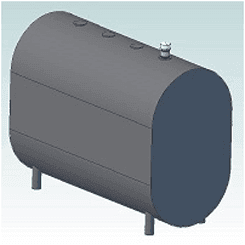
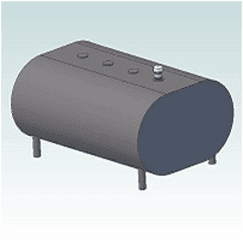
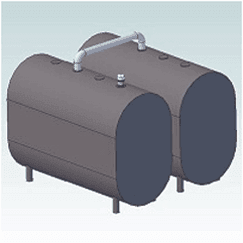
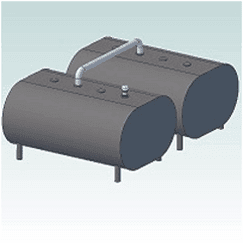
Most tanks have 2″ NPT fittings along the top. For tanks with 1.5″ or 1.25″ fittings, an adapter is required — and the adapter has to match your gauge model. Use the fit finder and we'll pair them for you.
*For outdoor installations the white cap must be sealed with Teflon tape or other means to prevent moisture ingress. Failure to do so voids the warranty. Expect level and consumption readings to vary with temperature changes.
| ID | Description | Capacity (gal / L) | H | W | L |
|---|---|---|---|---|---|
| 01 | 275 Vertical (round side up) | 275 / 1000 | 44″ | 27″ | 60″ |
| 02 | 275 Horizontal (flat side up) | 275 / 1000 | 27″ | 44″ | 60″ |
| 05 | 330 Vertical | 330 / 1250 | 44″ | 27″ | 72″ |
| 06 | 330 Horizontal | 330 / 1250 | 27″ | 44″ | 72″ |
| 10 | Roth 400L | 110 / 400 | 44″ | 28″ | 29″ |
| 11 | Roth 620L | 165 / 620 | 61″ | 28″ | 29″ |
| 12 | Roth 1000L | 275 / 1000 | 61″ | 29″ | 43″ |
| 13 | Roth 1000LH | 275 / 1000 | 54″ | 30″ | 51″ |
| 20 | 120 Vertical | 120 / 455 | 46″ | 23″ | 30″ |
| 21 | 138 Vertical | 138 / 525 | 44″ | 27″ | 30″ |
| 22 | 138 Horizontal | 138 / 525 | 27″ | 44″ | 30″ |
| 23 | 220 Vertical | 220 / 835 | 44″ | 27″ | 48″ |
| 24 | 230 Vertical | 230 / 870 | 44″ | 22″ | 60″ |
| 25 | 230 Horizontal | 230 / 870 | 22″ | 44″ | 60″ |
| 26 | 240 Vertical | 240 / 910 | 46″ | 23″ | 60″ |
| 27 | 240 Horizontal | 240 / 910 | 23″ | 46″ | 60″ |
| 111 | 500 Horizontal Cylinder (48″ diameter × 64″ long) | 500 / 1895 | 48″ | 48″ | 64″ |
| 113 | 550 Horizontal Cylinder (48″ diameter × 74″ long) | 580 / 2200 | 48″ | 48″ | 74″ |
Ask Alexa how much oil you have
Open the Alexa app on your phone and go to Skills. Search for Smart Oil Gauge, then sign in with your Smart Oil Gauge username and password to link the skill to your account.
To trigger the skill, always start with:
“Alexa, ask Smart Oil Gauge how much oil we have.”
Then follow up with shorter commands, like “When will we need oil?”
Tip: consider renaming your tank from its default (MyTank6541234) to something quicker for Alexa to say, like Rental Property. You can rename a tank in the app under settings or configure.
Still stuck?
Our support articles cover setup and troubleshooting in more detail, and there's a person in Danbury on the other end of the phone.
